
Assign Care Team is the area where you can assign or unassign clinicians to the Care Team. Clinicians can do visits without being assigned to the care team by adding a visit to the Patient's calendar.
Before clinicians can be assigned, the disciplines must be set via a Physicians's Order. This is done via Care Management > Create New Documentation.
Patients that are Assigned to Care Team clinicians are listed on the clinician's home screen under Assigned Patients.

Assign Clinician to a Patient
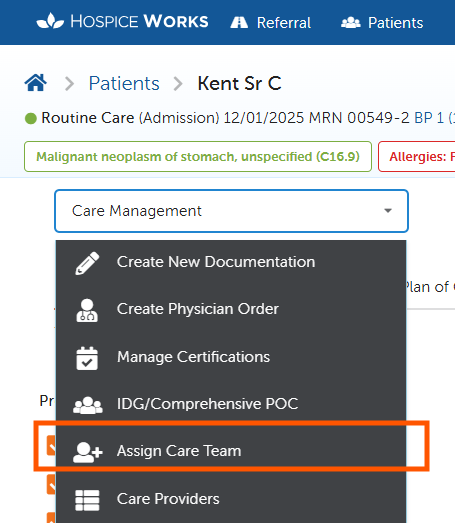
In the patient's chart click Care Management > Assign Care Team.


Click orange View button. Click Assign.


Only one clinician can be assigned to a discipline at a time. Therefore, if there is an existing clinician they will be unassigned but still show with the dates they were previously assigned.
Scheduled Visits when users are unassigned
- When a new user is assigned to a patient, any pending scheduled visits for the patient that were previously assigned to the previous user will be reassigned to the new user. This will occur from the start date of the new user assignment.
- When a user assignment is deleted, any pending scheduled visits that the user had for the patient they were assigned to will be automatically cancelled. This will occur from the start date of the user assignment.
- If an assignment is removed or marked as declined and there is a user tied to the assignment, any pending visits that the user had scheduled since the date set to the order will be automatically cancelled.
- These changes will be applied once the order is signed.