
Feature: Mandatory Assessment Sections (Signature Hard-Stop)
Why this matters (Compliance + Efficiency)
This feature helps teams stay CMS-aligned without adding extra clicks or forcing blanket documentation.
Improves compliance
Ensures new or worsening symptoms trigger the appropriate assessment update and intervention documentation before the note can be signed.
Prevents a common compliance risk: documenting a symptom change in narrative while leaving related assessment sections unchanged.
Promotes consistent clinical documentation by standardizing when and where assessment updates must be recorded.
Increases efficiency for clinicians
Only the relevant assessment sections become required—clinicians are not forced to re-document every assessment area.
Reduces rework by catching missing required updates before signing, instead of after.
Keeps documentation clean by focusing the final note on the clinician’s findings and interventions (not internal system prompts).
What this feature does
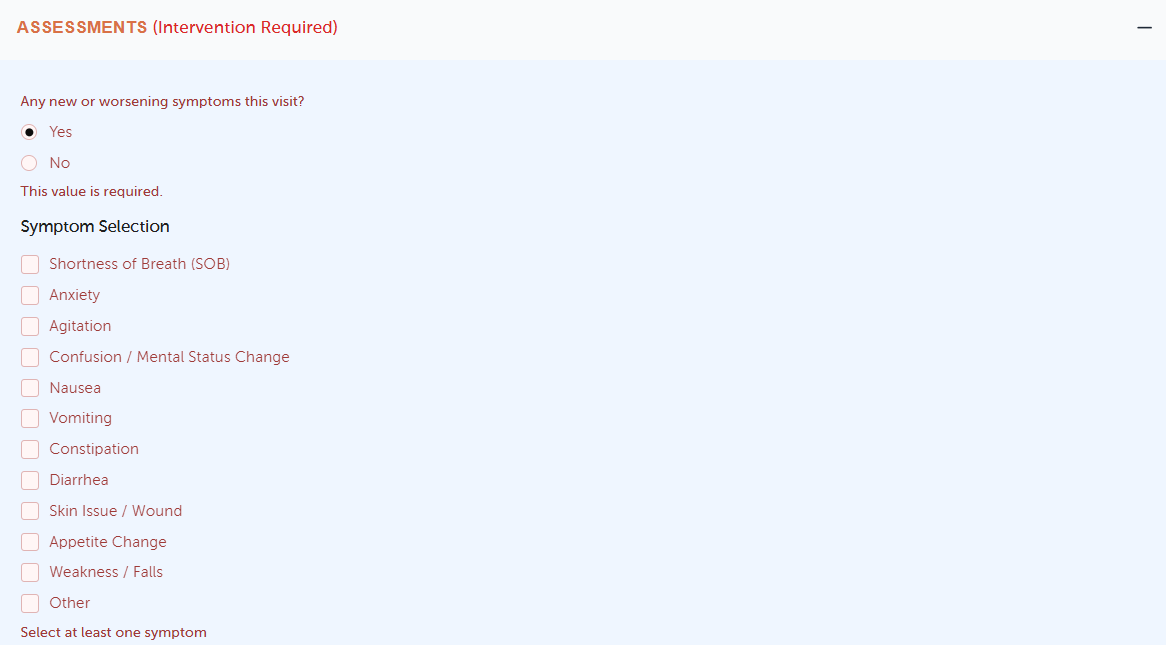
When documenting a Nurse Visit Note (NVN), clinicians must answer an internal-only question:
“Any new or worsening symptoms this visit?” (Yes/No, required)
If Yes, the nurse selects symptom(s). Based on the symptom selection, HospiceWorks automatically:
Makes only the relevant assessment section(s) mandatory (not the entire NVN)
Labels required sections as “Intervention Required” and auto-expands them
Disables “No Changes Noted” for those required sections
Blocks signing until required sections are completed or justified
This is designed to prevent signing an NVN when a new/worsening symptom occurred without documenting the assessment response.
Where you’ll see it
NVN → Assessments area (top of the Assessments section)
Step-by-step workflow
1) Answer the trigger question
At the top of Assessments, select:
Yes (if there are new/worsening symptoms this visit) or
No
2) If “Yes,” select symptom(s)
A checklist appears (examples include SOB, Anxiety, Agitation, Confusion/Mental Status Change, GI symptoms, Skin/Wound, Appetite change, Weakness/Falls, and Other).
3) Complete the required assessment section(s)
Once symptoms are selected, mapped assessment sections become mandatory:
Auto-expanded
Marked “Intervention Required”
“No Changes Noted” is hidden/disabled
Signing is blocked until completion or justification
A required section can be completed by either:
Documenting updated findings + interventions, or
Selecting a justification (e.g., Unable to assess, Patient refused, Symptom resolved during visit, Not clinically indicated—with brief comment when required)
4) Sign the NVN
If any required section is incomplete, you will not be able to sign.
Symptom-to-Assessment mapping (how the system decides what becomes required)
The mapping is configurable, and by default follows this mapping:
Shortness of Breath (SOB) → Cardiopulmonary (optional: Cardiovascular)
Anxiety → Mental / Neurological
Agitation → Mental / Neurological
Confusion / Mental Status Change → Mental / Neurological
Nausea / Vomiting → Elimination / GI
Constipation → Elimination / GI
Diarrhea → Elimination / GI
Skin Issue / Wound → Integumentary
Appetite Change → Nutrition
Weakness / Falls → Functional & ADLs / Safety
Other → Nurse selects assessment section(s) via a multi-select modal
Important behavior rules
If you change your answer from Yes → No
The system clears symptom selections and removes the mandatory enforcement, restoring normal section behavior (including “No Changes Noted”).
If you change No → Yes
The symptom checklist appears, but sections do not become mandatory until at least one symptom is selected.
If you deselect a symptom
The system removes requirements only if no other selected symptom still maps to that same assessment section.
What prints in the final signed NVN (and what does NOT)
This feature is internal-only and keeps the clinical record clean. The following will NOT appear in print/PDF/output:
The trigger question
The symptom checklist selections
Internal mapping flags
“Intervention Required” as a system flag (the UI indicator should not print as system-generated text)
The signed record should reflect only:
The nurse’s documented assessment findings
Interventions and narrative/comments within those sections
Troubleshooting
“Why can’t I sign the NVN?”
Most commonly:
A required assessment section is still incomplete, or
A required section needs a justification selected (e.g., patient refused)
“I selected a symptom, but nothing became required.”
You must select Yes and select at least one symptom before the system enforces required sections.
“I turned the trigger back to No—why did it reset?”
That is expected: Yes → No clears selections and removes all requirements created by this feature.
FAQ
Does this make the whole NVN mandatory?
No—only the mapped assessment sections become required.
Does the symptom trigger show on the printed NVN?
No—trigger details are internal-only and excluded from output.
Can an agency change the symptom → section mapping?
Yes—the mapping is intended to be config-driven (adjustable without rewriting UI logic).