
Election Statement Addendum — Medicare Admission Workflow
Overview
Effective October 1, 2026, Medicare requires hospices to furnish the Patient Notification of Hospice Non-Covered Items, Services, and Drugs addendum for applicable Medicare hospice elections.
HospiceWorks has incorporated this requirement directly into the admission workflow.
Who Needs the Addendum?
The mandatory requirement applies to:
Medicare hospice elections beginning October 1, 2026 or later.
For elections beginning before October 1, 2026, HospiceWorks does not automatically create the new mandatory admission requirement.
How HospiceWorks Triggers the Requirement
For an applicable Medicare admission, HospiceWorks automatically adds:
Election Statement Addendum
under the patient's 5-Day Admission Requirements.
HospiceWorks also:
- Calculates the due date automatically
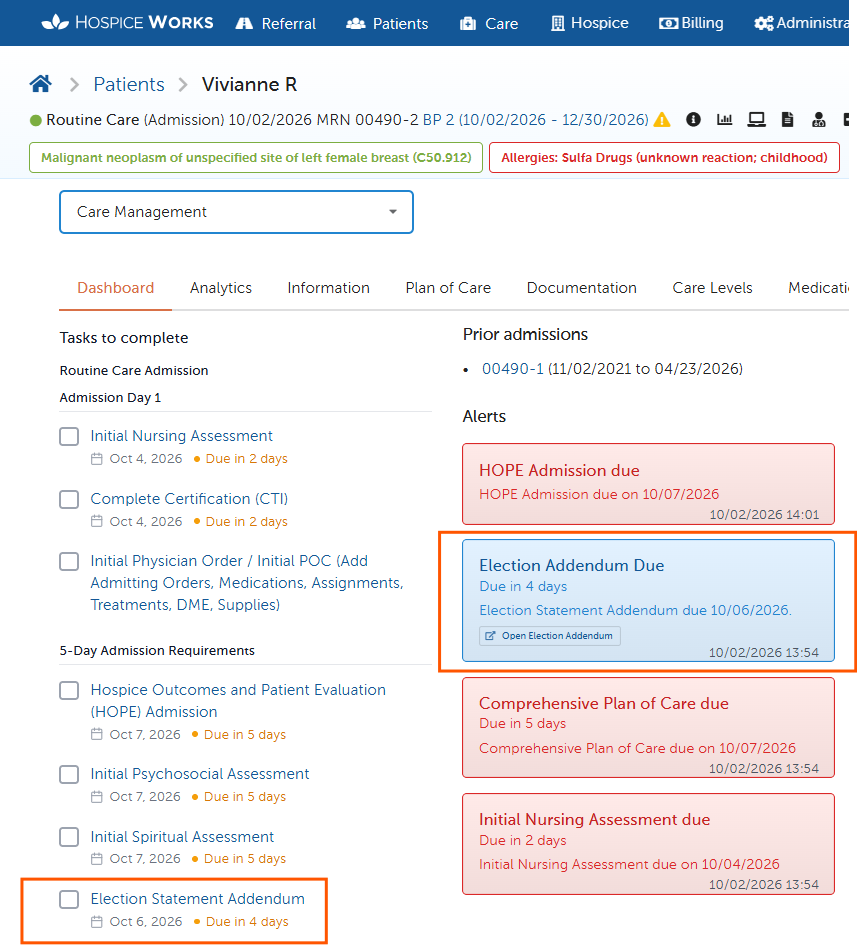
- Displays the task under Tasks to Complete
- Creates an Election Addendum Due alert
- Tracks completion of the requirement
The addendum must be furnished within the first 5 calendar days of the hospice election.
Example
If the hospice election is effective October 2, 2026, the addendum is due October 6, 2026.
Recommended Admission Workflow
1. Complete the Admission / Initial Nursing Assessment
Complete the patient's initial admission documentation and establish the clinical information needed for the admission.
2. Complete the Initial Physician Order / Initial POC
Complete the patient's initial:
- Diagnoses
- Medications
- DME
- Supplies
- Treatments and orders
- Coverage information
This should be completed before the Election Statement Addendum because HospiceWorks uses the patient's existing structured information to populate the form.
3. Open the Election Statement Addendum from Tasks to Complete
From the Patient Dashboard, locate Tasks to Complete.
Under:
5-Day Admission Requirements
select:
Election Statement Addendum
HospiceWorks will open the required addendum workflow for the patient.
The addendum may also be opened from the Election Addendum Due alert on the Patient Dashboard.
HospiceWorks uses the patient's existing diagnosis, medication, DME, supply, and coverage information to populate the addendum so staff do not have to enter the same information again.
Complete the Coverage Determination
The RN reviews the information and confirms the hospice's coverage determination.
HospiceWorks identifies information as:
- Hospice Covered — Related
- Not Hospice Covered — Unrelated
The addendum can include:
- Diagnoses and conditions
- Medications
- DME
- Supplies
- Additional non-covered items or services
If an item is determined to be unrelated and not covered by the hospice, a Clinical Explanation for Non-Coverage is required.
Once the addendum is complete, the RN finalizes the document.
HospiceWorks then creates the finalized PDF and changes the document to:
READY TO FURNISH
Current Signature Workflow — Print / Paper Signature
The current production release uses the Print / Paper Signature workflow.
1. Print the Addendum
After finalizing the addendum, select the option to print the document for signature.
2. Furnish the Addendum
Provide the finalized addendum to the beneficiary or representative.
Record:
- Date Furnished
- Furnished By
- Delivery Method
The Date Furnished is tracked separately from the signature date.
3. Obtain the Signature
The beneficiary or representative signs the printed addendum.
4. Upload the Signed Form
Once the signed paper copy is received:
Upload or scan the signed addendum into the patient's HospiceWorks record.
The signed document should remain part of the patient's medical record.
5. Update the Signature Status
After uploading the signed form, update the Addendum Signature Status to:
Signed paper copy received
Other available statuses may include:
- Signature pending
- Signature refused
- Unable to obtain signature
- Patient died
- Patient revoked hospice
- Patient discharged
- Other
If a signature cannot be obtained, document the appropriate reason in HospiceWorks.
Future Electronic Signature Release
A future HospiceWorks release planned for the end of October 2026 will add:
Sign Electronically Now
Allows the beneficiary or representative to electronically sign the addendum during the visit.
Send for Electronic Signature
Allows the hospice to send the completed addendum to the beneficiary or representative for remote electronic signature.
Once electronically completed, the signed document will automatically return to the patient's HospiceWorks record and update the signature status.
Print / Paper Signature will continue to remain available.
What Happens if Coverage Changes Later?
HospiceWorks continues monitoring coverage information after the initial addendum has been furnished.
A review may be triggered when:
- Medication coverage changes
- DME coverage changes
- Supply coverage changes
- A diagnosis changes from related to unrelated or vice versa
- A new or changed non-covered item or service is identified
When a qualifying change occurs, HospiceWorks creates:
Election Addendum Review Required
If the RN determines an updated addendum is required, HospiceWorks creates a new version and preserves the previous version.
The updated addendum is due within 3 calendar days of the qualifying change.
Not every Plan of Care change requires another addendum. The change must affect the addendum's covered/non-covered determination.
Quick Support Reference
Who needs it?
Medicare hospice elections beginning 10/01/2026 or later.
Where is the task located?
Patient Dashboard → Tasks to Complete → 5-Day Admission Requirements → Election Statement Addendum.
When is it due?
Within the first 5 calendar days of the hospice election.
What should be completed first?
Complete the admission documentation and Initial Physician Order / Initial POC so the patient's diagnoses, medications, DME, supplies, and coverage information are established.
Does HospiceWorks populate the form?
Yes. Existing structured patient information feeds the addendum workflow.
Who reviews/finalizes the form?
The RN.
Who signs it?
The beneficiary or beneficiary representative.
What is the current signature workflow?
Print the addendum, furnish it to the beneficiary/representative, obtain the signature, upload the signed form into HospiceWorks, and update the Signature Status to “Signed paper copy received.”
Electronic signature available now?
No. Sign Electronically Now and Send for Electronic Signature are planned for a future HospiceWorks release at the end of October 2026.
What if coverage changes later?
HospiceWorks can create an Election Addendum Review Required task and track the 3-day update requirement.
Are previous versions preserved?
Yes. HospiceWorks preserves prior versions and audit history.